
Product page
Bundles, BOGO, volume breaks, and add-ons under the buy button, so shoppers add without leaving the page.
Loud, native offers on every surface, and you keep 100%.
Free forever: 1 live offer, every surface and offer type.
Never blocks checkout · uninstalls clean
This is the real Bumps card, the exact one your shoppers see, rendered right in your Wix checkout. Accept and it's in the cart, discount applied. No redirects, no coupon dance, no theme code.
One system running offers across the whole path: product page, cart, checkout, and thank-you. No theme code, no second app.
Bundles, BOGO, volume breaks, and add-ons under the buy button, so shoppers add without leaving the page.
Cart bumps and progress thresholds that lift AOV before checkout, accepted right in the cart.
Low-friction checkout bumps that respect payment mode. No fake urgency, no checkout blocks.
Post-purchase upsells on the thank-you page to reconvert without third-party ads.
Most upsell apps tell merchants to blend in, so they color-match, go live, and nothing happens. The offer nobody notices never converts. Bumps ships loud by default.
Switch the style in one click. Every look except Minimal keeps what gets an offer noticed: the accent, the price up front and a solid button.
The default. Accent eyebrow, the price up front and a solid button with a shine, built to get noticed.
Go on, try them. These are the exact cards our engine renders in your store, down to the pixel and the motion. Not mockups.
A discount is hiding here. One scratch to reveal yours.
The mechanics that make an upsell actually land, on by default.
Bundles, volume breaks, BOGO, progress rewards, scratch reveals, checkout add-ons, post-purchase: the mechanic that fits each step of the funnel, not one blunt popup everywhere.
See them liveOffers fail silent. If anything is off, Bumps simply disappears. It can never cost you a sale.
How it stays safeLoud by default, because an upsell nobody notices never converts. Pick a look to match your store and the offer stays easy to spot. Only Minimal goes quiet.
Try the looksAccept adds the line straight to the real cart, discount applied. Not a coupon-code dance, not a bounce back to the product page.
See it liveShips as Wix Site Plugins. Installs and removes clean, with nothing pasted into your theme and no theme code left behind.
How install worksA bandit shifts traffic toward whichever offer is converting. When an A/B test turns conclusive, the winning variant goes to 100% on its own. No manual test-wrangling.
How it optimizesFrom install to live offers in three steps, and never any theme code.
Add Bumps from the Wix App Market. Site Plugins land in the right slots, with no theme code.
Install on WixStart from a conversion-first offer template: cart bump, volume bundle, BOGO, and more.
See the templatesPublish. Shoppers see loud, on-brand offers. The dashboard shows what each one earned.
See pricingBumps costs $0, $9.99 or $39.99 a month, flat: never a cut of your sales, never a per-order fee. No overage bill after a good ad day. Billed yearly, the paid plans are 20% less: Starter $7.99 and Growth $31.99 a month.
Free
$0 forever
Free forever: 1 live offer, every surface, full quality. Not a trial trap.
Starter
$9.99 /month
Run the funnel: up to 5 offers at once.
Growth
$39.99 /month
Optimize: unlimited offers, A/B bandit, smart targeting, deep styling.
The questions merchants ask before installing, including the ones that don’t flatter us.
Still deciding? The Free plan is free forever: 1 live offer, every surface and offer type, full quality.
Start free →A checkout bump (or order bump) is a small add-on offer shown while a shopper checks out: gift wrap, a warranty, a companion product. Bumps renders bumps as native Wix checkout elements: no popup, no redirect, and they never block checkout.
No. Bumps costs $0, $9.99 or $39.99 a month, flat: never a cut of your sales, never a per-order fee. There are no per-view meters either, and the revenue your offers generate stays 100% yours.
The levers that reliably lift AOV: cart bumps and add-ons before checkout, volume bundles and quantity discounts, progress thresholds toward a perk, and a post-purchase upsell on the thank-you page. Bumps runs all of these across the product, cart, checkout, and thank-you surfaces, with a built-in A/B bandit that keeps the best-performing offers live.
A post-purchase upsell is an offer shown after the shopper has paid, typically on the thank-you page. Wix does not let apps add items to an order that is already placed, so accepting a Bumps thank-you offer puts the item in a new cart with the offer discount already applied, and the shopper completes a separate checkout that ships separately. The offer renders natively on the Wix thank-you page, with no third-party ads.
Pricing models vary across the category. Some apps take a percentage of upsell revenue, others bill by order volume or per view, and some charge a flat fee. Bumps costs $0, $9.99 or $39.99 a month, flat: never a cut of your sales, never a per-order fee. Free runs 1 live offer forever, Starter runs 5 at once, and Growth is unlimited.
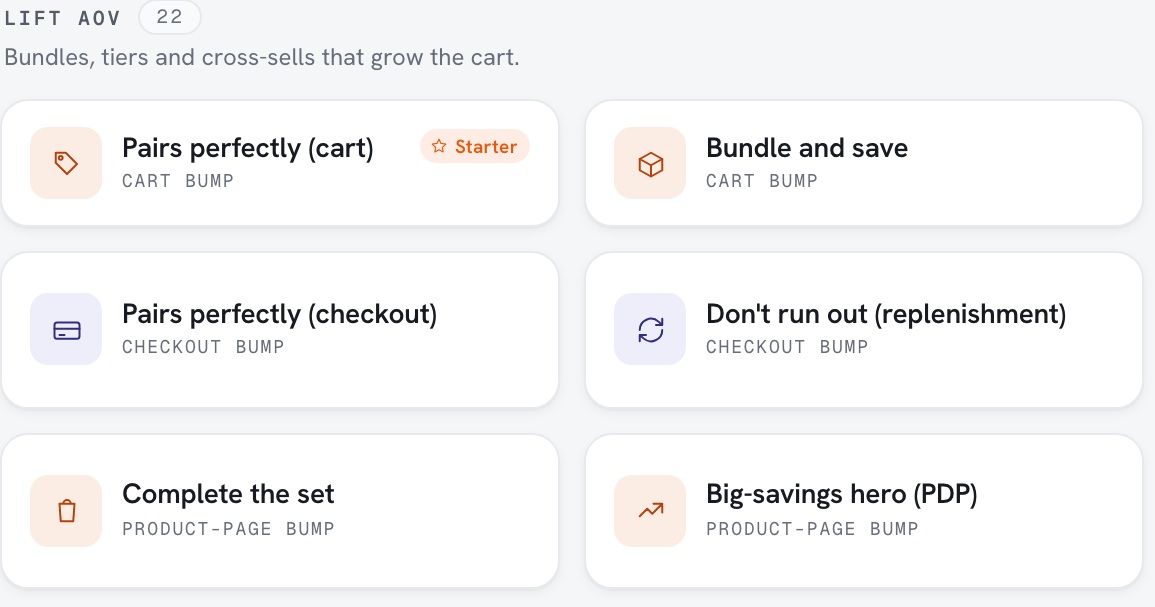
With Bumps: cart bumps, checkout bumps, product-page cross-sells, frequently-bought-together bundles, volume bundles, BOGO and mix & match bundles, progress thresholds, gamified scratch reveals, optional add-on fees, and thank-you upsells.
No. When a shopper accepts an offer, Bumps adds the product to their real Wix cart as a normal line item and applies the discount server-side, either as an automatic Wix discount rule or as a coupon the app mints and applies for them. There is no code to copy, no code box to find, and no bounce back to the product page. Bumps also verifies the item actually landed in the cart before it shows the shopper a success state.
No. Bumps installs from the Wix App Market as native Site Plugins and renders offers in the standard storefront slots. Nothing is pasted into theme code, and uninstalling leaves no theme code behind.
Not natively. Wix Stores does not include order bumps or post-purchase upsells out of the box. Bumps adds them as native Site Plugins across the product page, cart, checkout, and thank-you page, with no theme code.
Install Bumps from the Wix App Market, pick a conversion-first offer template (cart bump, volume bundle, BOGO, and more), and publish. The offers drop into the right storefront slots automatically, and you never touch theme code.
Yes. Bumps is built for Wix Stores with native Site Plugins. It is not a Shopify app.
No to both. Bumps renders as a Wix Site Plugin inside the checkout page rather than sitting in front of it, and an offer draws nothing at all until its own data has resolved, so it is never in the path between a shopper and the Pay button. And it is designed to fail silent: if anything is off, the offer simply does not appear. It never blocks checkout and never removes items from the cart.
Through Wix. Bumps uses Wix-managed plans, so a paid plan is billed to the same Wix account that runs your site. No separate checkout, no second card on file, no invoice from us. You upgrade, downgrade, or cancel from the app’s page in your Wix dashboard. For what the plans cost, see the pricing question above.
Yes. Pick a look in one click: Loud (the default), On-brand, Premium, Dark, Vibrant, Soft, Organic or Minimal. Every look except Minimal keeps the accent, the price up front and a solid button, so the offer still gets noticed, and On-brand gives most offers your Wix theme’s button color. Minimal is the quiet one and it usually converts worse, which we say plainly.
Yes, in two ways. If you run an A/B test on an offer (Growth plan), Bumps checks it daily and, once one version is clearly ahead, gives it 100% of that offer's traffic and drops the others to zero. That auto-promote is on by default, and you can also promote a winner by hand at any time. Separately, when several proven offers are eligible for the same slot, a Thompson-sampling bandit keeps shifting traffic toward whichever converts best. A brand-new offer added next to an established one waits until you archive the established one, so an untested offer never takes traffic from one that is already working.
Nothing is destroyed straight away. Uninstalling stops every offer immediately, removes the Site Plugins from your storefront with no leftover theme code, and revokes API tokens at once. Your offers, settings, and performance history are kept for 90 days, so reinstalling within that window puts you back on the dashboard you left rather than a blank one. After 90 days they are permanently deleted. One thing outlasts the app briefly: the automatic Wix discounts behind bundles and spend-goal bars keep applying until they expire, within 30 days.
Install on Wix, pick a template, go live. Bigger orders, same checkout.
Install on WixFree plan · not a trial · clean uninstall